01
FREE
Try everything that matters for free
No paywall between you and playback, organization, or search.
Bring videos and music from your device, cloud, and home NAS into one shelf with covers, descriptions, and tags. Core playback and organization features are free.
Start without an account · No playback limits · Remove ads anytime with one purchase
 KuroPlayer ● FREE
 Make your media feel like a collection
Device, cloud, and NAS in one library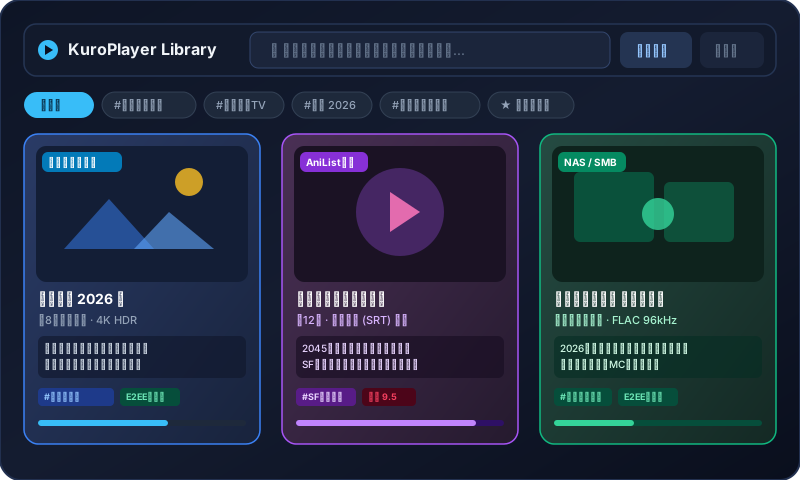
FREE
No paywall between you and playback, organization, or search.
ORGANIZE
Turn a list of filenames into a shelf worth revisiting.
PLAY
One familiar experience for device, cloud, and NAS.
Personal Library & Curation
Transform scattered video and audio files into a stunning personal bookshelf, just like your own private cinema or bookstore. Easily swap cover art, write synopses and review notes, and organize with custom hashtags.
✓Works can be viewed as shelves or lists. Auto-fetch metadata from AniList/Wikipedia or customize images and synopses by hand.
Core Features
Wherever your files live, our high-speed SQLite index, flexible curation tools, and powerful playback engine bring you the ultimate personal collection experience.
Smart Shelves
Intelligently groups multi-episode series based on episode numbering (Episode 01, EP01) and shared titles, while keeping standalone films distinct.
Read-Through Cache
Start watching cloud or SMB videos immediately without downloading whole files. Read ranges are cached locally for smooth offline replay.
Cover & Artwork
Set any folder image or screenshot as your cover with a single tap. Supports automatic artwork fetching from AniList, Wikipedia, and TMDb with easy long-press refresh.
Tags & Genre
Create custom hashtags like #FamilyMemories, #Trip2026, or #Anime along with multi-axis ratings. Filter and find what you want instantly.
Instant Search
An integrated search bar powered by on-device SQLite FTS5 index. Instantly finds titles, synopses, tags, and artists with zero network waiting time.
Car Mode
Tap the car icon for a distraction-free interface with oversized buttons, designed to minimize touch errors while driving or using a car mount.
High Performance Player
Switch audio/subtitle tracks on the fly, load external subtitles (SRT/WebVTT), adjust playback speed from 0.5x to 3.0x, change aspect ratios, and pinch-to-zoom or rotate — all without pausing playback.
Seamless background audio playback when the screen is turned off, plus Picture-in-Picture multitasking on supported devices.
Effortlessly switch between audio tracks and multi-language subtitles, adjust font sizes and positions, or load external subtitle files.
Comprehensive support for H.264/HEVC, MP4/MKV/WebM, and MP3/FLAC/AAC/WAV/ALAC with prioritized hardware acceleration for efficient playback.
Pricing
Playback and library organization are free in KuroPlayer. If it becomes part of your routine, remove ads with one purchase. Monthly plans are optional extras for encrypted backup and family sync.
One purchase when it earns a place in your day.
✓ Try it free before you decide
Encrypted cloud storage is an optional extra.
Subscribing does not unlock exclusive codecs or playback features. It is purely for secure cloud storage and cross-device sync.
Zero-Knowledge Cloud Backup
With a cloud subscription, your library configurations, custom covers, synopses, and playback progress are safely backed up to the cloud. Restore everything seamlessly with your passkey if you switch or lose a device. All data is end-to-end encrypted before transmission, ensuring no server admin or third party can ever see your content.
Library shelf arrangements, custom covers, descriptions, tags, and history are encrypted locally before being transmitted.
The server only stores unreadable encrypted ciphertext. No staff member or outside entity can preview, search, or inspect your data.
When moving to a new phone or recovering from loss, easily and securely decrypt and restore your library using your biometric passkey.
By design, private home videos and curated library settings can never be leaked or exposed to the public.
Zero-knowledge encryption: Encryption keys exist only on your personal devices. Server admins cannot decrypt or inspect your data.
Family & Memory Album
Share an account across family members with cloud sync to build a private home video archive for family trips, birthdays, and milestones. Cherish and watch your moments together in a secure, end-to-end encrypted space without uploading to public social media.
Organize home videos with date tags, location markers, and diary-like episode descriptions for a digital family treasure you can look back on anytime.
Access the same memory library from your living room tablet, smartphones, or computers with smooth, high-quality playback from where you left off.
Private family videos are protected with strong E2EE encryption. Never worry about third-party AI analysis or accidental public sharing.
Release Status
We are actively testing bookshelf libraries, SQLite FTS5 indexing, device file selection, native video playback, and encrypted cloud synchronization on iOS and Android devices. App Store and Google Play availability will be announced here.
※ Notice: Please ensure that all videos and media you play are lawful (such as private use copying under applicable copyright laws) based on your own judgment before using this app.